
UniGetUI: A Simple and Powerful Package Manager Interface for Windows
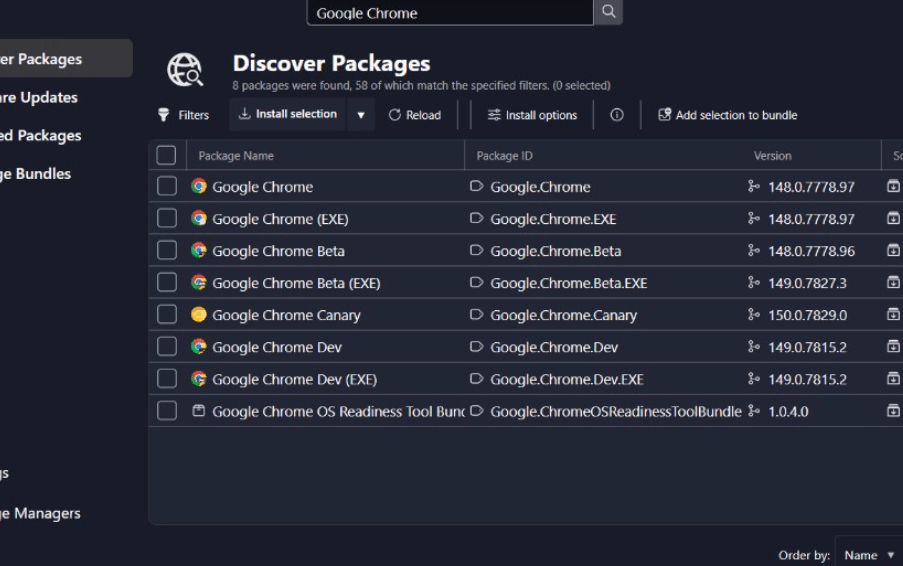
Managing software on Windows can sometimes feel time-consuming, especially when users need to install, update, or remove multiple applications manually. This is where UniGetUI has gained attention among Windows users who want a more organized and efficient way to handle software management. As package managers become more popular, graphical interfaces like UniGetUI help simplify the experience for both beginners and advanced users.
Modern Windows users increasingly prefer tools that automate software installation and updates while providing a clean and user-friendly interface. UniGetUI stands out because it combines several package management systems into one convenient platform. It allows users to manage applications more efficiently without relying entirely on command-line tools.
This article explores UniGetUI in detail, including its features, benefits, usability, popularity, comparisons, and future potential in the Windows software ecosystem.
Introduction to UniGetUI
UniGetUI is a graphical user interface designed for Windows package managers. It helps users install, update, remove, and manage software packages through a simple and organized interface instead of relying only on command-line commands.
Package managers are becoming increasingly important because they automate software management tasks and help users maintain updated applications more efficiently. However, many package managers are command-line based, which can feel difficult for less technical users. UniGetUI solves this problem by providing a visual interface that simplifies package management operations.
The platform is especially useful for users who want faster software management while maintaining better control over installed applications.
What Is UniGetUI?
UniGetUI is a Windows application that acts as a graphical frontend for multiple package managers. It allows users to manage software installations from one centralized interface.
The tool commonly supports package managers such as:
- Winget
- Scoop
- Chocolatey
- Pip
- Npm
Instead of entering commands manually, users can browse, install, update, and remove applications through an easier visual environment.
UniGetUI is designed to improve accessibility for users who may not be comfortable using terminal commands while still offering advanced functionality for experienced users.
Why UniGetUI Is Gaining Popularity
Several important factors contribute to the growing popularity of UniGetUI among Windows users and developers.
Simplified Software Management
Many users prefer graphical interfaces over command-line tools because they are easier to understand and navigate.
Growing Use of Package Managers
Windows package managers are becoming more common as users seek automated software installation and update systems.
Support for Multiple Package Managers
UniGetUI combines several package management systems into one interface, reducing the need for separate tools.
Time-Saving Convenience
The platform helps automate updates and software management tasks, saving users time and effort.
Open-Source Community Interest
Open-source software continues gaining popularity because of transparency, flexibility, and community-driven development.
Key Features of UniGetUI
UniGetUI includes several features that improve the Windows software management experience.
Unified Package Management
The platform allows users to manage multiple package managers from a single interface.
Graphical User Interface
The visual layout makes package management more accessible for users unfamiliar with command-line environments.
Application Search Functionality
Users can search for applications quickly and install them directly from supported package sources.
Bulk Updates
UniGetUI allows users to update multiple applications simultaneously, improving efficiency.
Software Removal Options
Applications can be uninstalled through the interface without navigating different package manager commands.
Notification System
Some versions provide update notifications to help users keep software current.
Benefits of Using UniGetUI
Many Windows users adopt UniGetUI because it simplifies software management while improving convenience and organization.
Easier Learning Curve
Beginners can manage software packages without memorizing complex commands.
Faster Application Updates
Bulk updating features reduce the time required to maintain installed applications.
Centralized Software Control
Managing multiple package systems through one interface improves organization and efficiency.
Reduced Manual Work
Automation features help minimize repetitive installation and update tasks.
Better Accessibility
The graphical environment makes package management more approachable for general users.
How UniGetUI Improves User Experience
User experience is one of the main reasons why graphical package manager interfaces continue growing in popularity.
Clean Interface Design
A simple and organized layout improves usability and reduces confusion.
Faster Navigation
Users can browse applications and package lists more efficiently.
Visual Package Information
Graphical displays provide clearer details about available software and updates.
Simplified Operations
Installing or removing software often requires only a few clicks instead of manual command entry.
Content Quality and Reliability
Reliability is extremely important for software management platforms because users depend on them to install and maintain applications safely.
Open-Source Transparency
Open-source development often increases trust because users can review code and community discussions.
Package Source Integration
UniGetUI relies on trusted package managers that already maintain large software repositories.
Regular Development Updates
Community-driven development can help improve compatibility and performance over time.
UniGetUI Compared With Other Package Management Tools
The Windows software management ecosystem includes several tools designed for package installation and automation.
Traditional Software Installation
Traditional installation methods often require downloading installers manually from websites.
Command-Line Package Managers
Tools like Winget and Scoop provide strong functionality but may feel intimidating for non-technical users.
Software Updater Utilities
Some update managers only focus on updates, while UniGetUI combines installation, updating, and removal features.
Tips to Use UniGetUI Effectively
Users can improve their software management experience by following a few practical recommendations.
Keep Package Sources Updated
Updated package lists help ensure access to the latest software versions.
Review Application Details
Always verify software information before installation.
Use Bulk Updates Carefully
Updating many applications at once can save time, but users should still review important software changes.
Explore Supported Package Managers
Learning how different package managers work can improve flexibility and software availability.
The Future of UniGetUI
As Windows package management continues evolving, tools like UniGetUI are likely to become even more valuable.
Increased Automation
Future versions may offer more advanced automation and scheduling options.
Better Windows Integration
Package management systems may become more deeply integrated into Windows environments.
Expanded Package Support
Additional repositories and package managers may be supported over time.
Growing Open-Source Community
Community contributions can continue improving features, stability, and compatibility.
FAQs About UniGetUI
What is UniGetUI?
UniGetUI is a graphical interface for Windows package managers that helps users install, update, and manage software more easily.
Which package managers does UniGetUI support?
UniGetUI commonly supports Winget, Scoop, Chocolatey, Pip, and Npm.
Is UniGetUI free to use?
Yes, UniGetUI is generally available as an open-source and free-to-use application.
Why do users prefer UniGetUI?
Many users prefer it because it simplifies package management through a clean graphical interface.
Can beginners use UniGetUI?
Yes, UniGetUI is designed to make package management easier for both beginners and advanced users.
Does UniGetUI help with software updates?
Yes, UniGetUI allows users to update multiple applications efficiently through one centralized interface.
Conclusion
UniGetUI represents the growing importance of graphical package management tools within the Windows ecosystem. As more users seek faster and more organized ways to install, update, and manage software, platforms like UniGetUI continue gaining popularity.
By combining multiple package managers into a simple interface, UniGetUI helps make software management more accessible, efficient, and user-friendly. Its support for automation, bulk updates, and centralized control makes it especially valuable for users who regularly manage many applications.
As package management becomes increasingly common on Windows, UniGetUI is well-positioned to remain a useful solution for users who want a cleaner and more convenient approach to software management.